


QHC Series 4K Signage Display 700cd

Maximum impact in minimum space
Ultra Slim Depth
The QHC’s ultra-slim thickness of 28.5mm makes it the thinnest option in Samsung’s UHD 4K series. Its sleek design and Slim Fit Wall Mount¹, helps you optimise space and install it neatly in a wide range of business environments.


¹ Slim Fit Wall Mount must be purchased separately.
Clean visuals in landscape or portrait mode
Even Bezel
The QHC’s bezels are consistent and even on all four sides of the display, with the same thickness and dimensions. The new even bezel design² helps prevent visual issues from arising when the display is adjusted to portrait mode.


² When compared to Samsung’s previous UHD signage models.
Secure and even mounting
Centred VESA Holes³
The central positioning of the VESA holes on the back of the display helps evenly distribute its weight for secure mounting. With the VESA holes positioned in the centre, this helps prevent the display from tilting unintentionally when adjusted into portrait mode.


³ The position of the VESA holes may vary slightly by model.
Lifelike colour expression
Dynamic Crystal Colour
The QHC series features Dynamic Crystal Display, using 10 bit processing for vivid colour expression, allowing viewers to enjoy a wide spectrum of colours.


* Images simulated for illustrative purposes only.
View lifelike shades of colour in powerful 4K
Quantum Processor Lite 4K⁴
Intelligent UHD upscaling technology, made possible by Samsung’s Crystal Processor 4K, enables content developed at a lower resolution to be elevated to UHD-level quality. It also performs edge restoration and noise reduction to help optimise on-screen text and imagery.


* Images simulated for illustrative purposes only. “Conventional” refers to Samsung’s FHD models.
⁴ Viewing experience may vary according to type of content and format. Picture quality of upscaled content varies depending on resolution of source content.
Clear visibility
Non-Glare
The QHC features non-glare panels that help provide visibility across a variety of environments. This helps allow businesses to deliver accurate information in various ambient lighting conditions.


* Images simulated for illustrative purposes only.
Connect with convenience
Home User Interface (UI)
The QHC series’ home screen UI displays popular categories like Favourites, Sources and Settings on the same screen for convenience. The Favourites folder grants users quick, easy access to frequently used features.


Collaborate between screens with wire-free speed
Smartview+⁵
SmartView+ enables wireless screen sharing without cable connections to assist with easy collaboration. Users can now enable the screen sharing functionality at the start of a meeting, allowing the meeting admin to quickly switch between screens with one click.


⁵ Windows, Android and iOS are supported.
Streamlined calibration between screens with mobile app
Smart Calibration⁶
Maintain brand consistency across every display in every location. Using the Samsung mobile app, Smart Calibration helps ensure every display is calibrated correctly, showcasing brand logos and other collateral in the exact colours required.


* Images simulated for illustrative purposes only.
⁶ App is available for download via the Android Play Store. Solution is managed via direct Wi-Fi between display and mobile device.
Enhance professional environments with expert tools
Professional Modes
Built-in professional modes enable more possibilities in specific verticals. Director Mode minimises post-processing enhancements, helping to align content to the director’s original intention. Medical teams can simulate medical images such as X-rays with DICOM Simulation Mode⁷, meeting DICOM’s full greyscale standards.

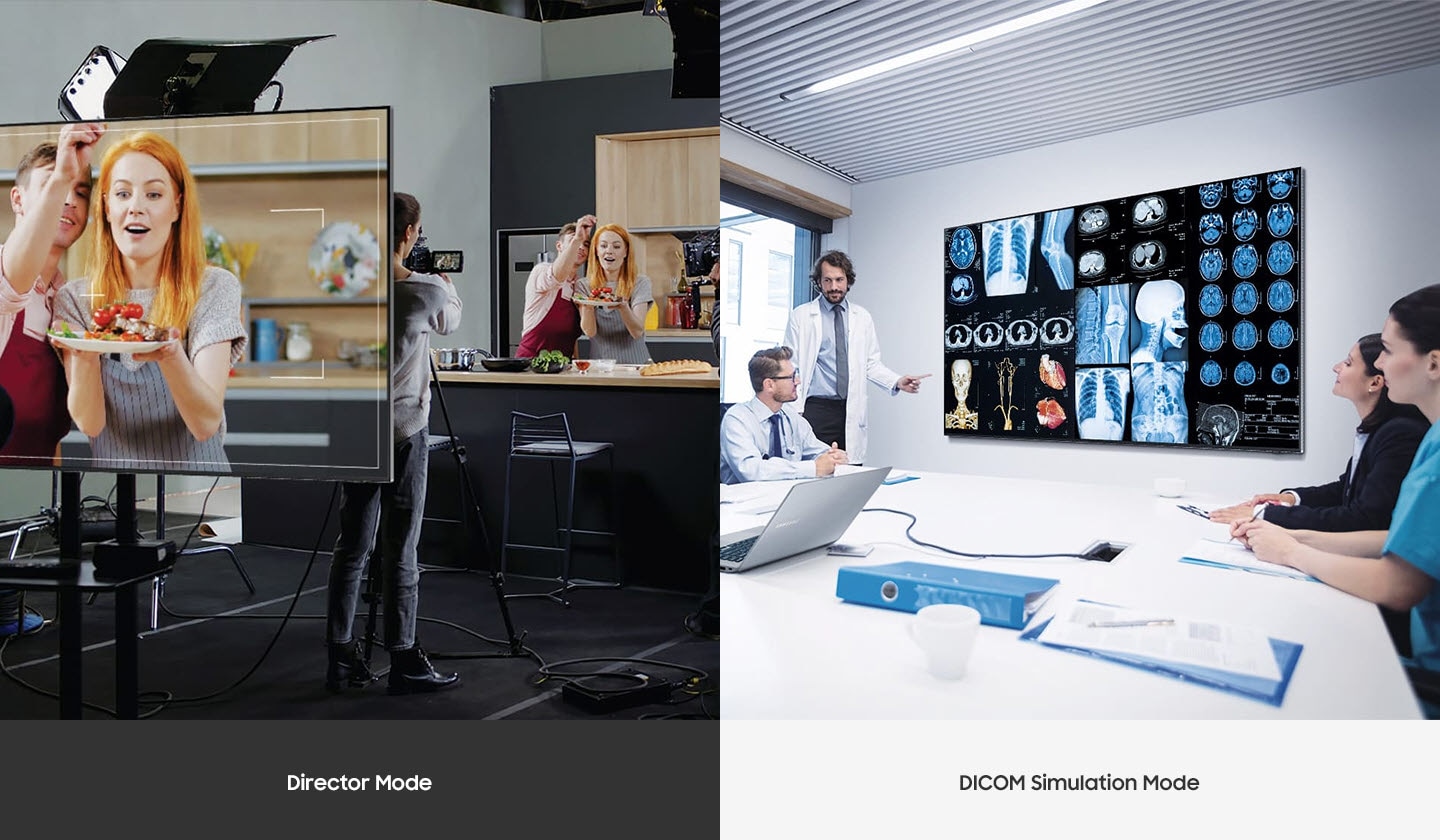
⁷ DICOM: Digital Imaging and Communications in Medicine. Display provides a simulated experience and is not intended for diagnosis purposes.
Smooth and virtually seamless content playback
MagicINFO S10 Player⁸
The embedded MagicINFO™ S10 player, backed by the powerful Tizen operating system, helps boost the overall performance of the display and offers painless management. This helps ensure seamless transitions and playback to deliver a better experience for both customers and store managers.


⁸ MagicINFO licence must be purchased separately.
Everyday Sustainability
Energy Star and EPEAT Certification
Samsung is making diverse efforts to reduce our environmental impact in smart display, and encouraging users to pursue a more sustainable life. The QHC series has earned a series of certifications for environmentally preferable products from highly recognised institutes in the U.S⁹.


⁹ QHC series has earned an ENERGY STAR 8.0 certification from the Environmental Protection Agency for its energy efficiency and an Electronic Product Environmental Assessment Tool (EPEAT) certification in recognition of its eco-conscious efforts, such as its recycled plastic use.
Specifications
Specifications Detail
Display
- Diagonal Size75″
- Panel TypeVA
- Resolution3,840 x 2,160
- Pixel Pitch (HxV)0.429×0.429mm
- Brightness (Typ)700 nit
- Contrast Ratio⁵4,000:1
- Viewing Angle (H/V)178/178
- Response Time8ms
- Colour Gamut72% (NTSC)
- Glass Haze25%
- H-Scanning Frequency30~81kHz
- Maximum Pixel Frequency594MHz
- V-Scanning Frequency48~75Hz
- Contrast Ratio (Dynamic)Mega
- Operation Time Support24/7
Connectivity
- HDMI In3
- DP In1
- Version of HDMI2
- Version of DP1.2
- Version of HDCP2.2
- USB2
- IR InYes
- Audio InNo
- Audio OutStereo Mini Jack
- RS232 InYes
- RS232 OutYes
- RJ45 InYes
- WiFiYes
- BluetoothYes
Power
- Power SupplyAC100-240V 50/60Hz
- Power Consumption (On Mode)275 W
- Power Consumption (Sleep Mode)0.5 W
Dimension
- Set Dimension (WxHxD)1682.3 x 960.4 x 28.5 mm
- Package Dimension (HxWxD)1839 x 1113 x 180 mm
Weight
- Net Weight34.6 kg
- Package Weight45.3 kg
Operation Conditions
- Temperature0℃~ 40℃
- Humidity10 ~ 80%, non-condensing
Mechanical Specification
- VESA Mount400 x 400 mm
- Bezel Width13.4mm (even)
- Frame MaterialNon-Glossy
Optional Feature
- MountWMN-B50SC
- StandSTN-L6585C
SoC
- OS VersionTizen 7.0
- Flash Memory Size16GB
Certification and Compliance
- EMCClass B
- Safety60950-1, 62368-1
Price range: $1,278.72 through $12,206.38
Product Details
Maximum impact in minimum space
Ultra Slim Depth
The QHC's unparalleled ultra-slim 28.5 mm depth makes it the thinnest option in Samsung’s UHD series. It is compatible with a separate Slim Fit Wall Mount, which allows you to install it neatly and easily in any location. QHC optimizes space with its sleek design that blends seamlessly into your business environment.
Slim design. Stunning performance.
Elegant UHD Signage - QHC Series
Introducing QHC, the slimmest display in the Samsung UHD Signage. It brings elegance to your business display while maximizing space. Its enhanced internal solutions and intuitive home screen UX make it easy to use. Businesses in various verticals can achieve growth with QHC’s efficiency and design innovation.

Change your approach to display management
Samsung VXT
Start your Samsung VXT* 60 day free trial today. Samsung VXT is a cloud-based, digital signage software solution that brings together content management and remote device management capabilities. It allows users to remotely manage hardware settings and troubleshoot issues from afar, while effortlessly creating and deploying content without the need for training.

Clean visuals in landscape or portrait mode
Uniform Bezels
The bezels are consistent and even on all four sides of the display, with the same thickness and dimensions. The uniform design allows for visual consistency when the display is adjusted to portrait mode.1


Secure and even mounting
Centered VESA Holes
The central positioning of the VESA holes on the back of the display enable the weight to be evenly distributed for secure mounting. With the VESA holes now shifted to the center, users can adjust the display to portrait mode, while avoiding unintentional tilting.
Lifelike color for a pure, immersive viewing experience
Dynamic Crystal Color
Every picture is more immersive with one billion shades of color. Dynamic Crystal Color delivers true-to-life variations, allowing customers to see every subtlety.


View lifelike shades of color in powerful 4K
Quantum Processor Lite 4K
Samsung’s industry-leading video processing technology enhances every piece of content for clarity and consistency. Intelligent UHD upscaling technology, powered by Samsung’s Quantum Processor Lite 4K, elevates lower-resolution video to UHD, providing a professional picture quality.2
Ensure critical information is always visible
Non-glare
QHC displays feature reliable, non-glare panels that provide better visibility from all angles, any time of day. The non-glare display enables businesses to deliver accurate information in crucial locations, such as airports and train stations.


Connect with convenience
Home UI
QHC boasts greater usability with an upgraded home screen UI. For the ultimate convenience, popular categories such as Favorites, Sources, and Settings are displayed on the home screen, all available in one place. The Favorites folder grants users quick, easy access to frequently used features in a single click.
High-speed collaboration between screens, all wire-free.
Smartview+
SmartView+ enables wireless screen sharing without cable connections, ensuring easy collaboration. Users can enable the screen sharing function at the start of the meeting, allowing administrators to switch which screens are shared with no wires necessary.


Simplified calibration between screens with mobile app
Smart Calibration
Guaranteed brand consistency across every display in every location. Using the Samsung mobile app, Smart Calibration ensures accuracy for every display, with precise calibration that showcases logos and other collateral in the exact brand colors, as required.
Everyday Sustainability
Energy Star / EPEAT* / TÜV Rheinland Carbon Footprint*
Samsung is engaged in multiple efforts to reduce our environmental impact in smart signage. We encourage our users and customers to pursue a more sustainable life, as well. As a result, QHC series has earned a series of certifications for environmentally preferable products from highly recognized organizations in Germany and the U.S.


Only logged in customers who have purchased this product may leave a review.
Reviews